
Human lead, AI enhanced coaching
Human coaches are a key differentiator at Omada, but their tools had not kept up with a rapidly evolving program. In 6 months we went from concept to launch on a brand new system enabling our coaching team to work with patients more efficiently and effectively by restructuring the information architecture, simplifying the visual language, and introducing new AI tools to automate rote tasks.
impact

Positive feedback from users and build teams

23% decrease in week 1 time spent
My Role
I was the sole designer on this project running our weekly co-design research sessions, defining the experience strategy, and executing on the UI work. I also worked with our operations team to socialize and train coaches on the new tool.

Where we started
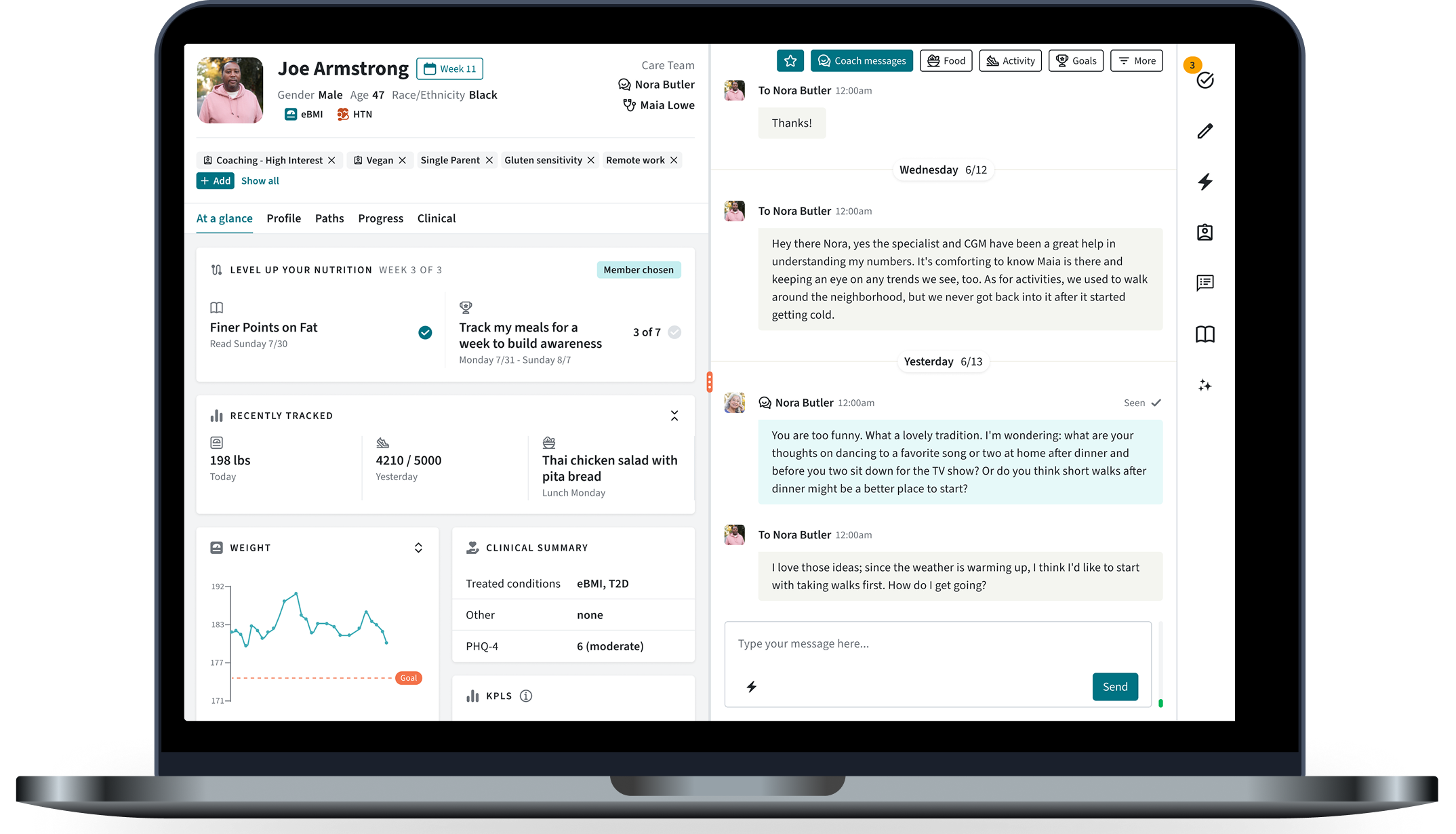
The team focused on developing our internal tools had struggled to get stakeholder buy in for a major overhaul for years, and the system had reached a breaking point. I’d worked the year before on a vision for our patient experience and used that as a jumping off point to build buy in for redesigning our internal tooling to support the new patient-facing features.
I worked with the operations team, the squad that owned the internal platform, and our product leadership team to build a case for why we needed to redesign and refactor our coaching tools now. Once I had buy in, I embedded with the squad responsible to bring the vision to life.
Co-Design & Continuous researCH process
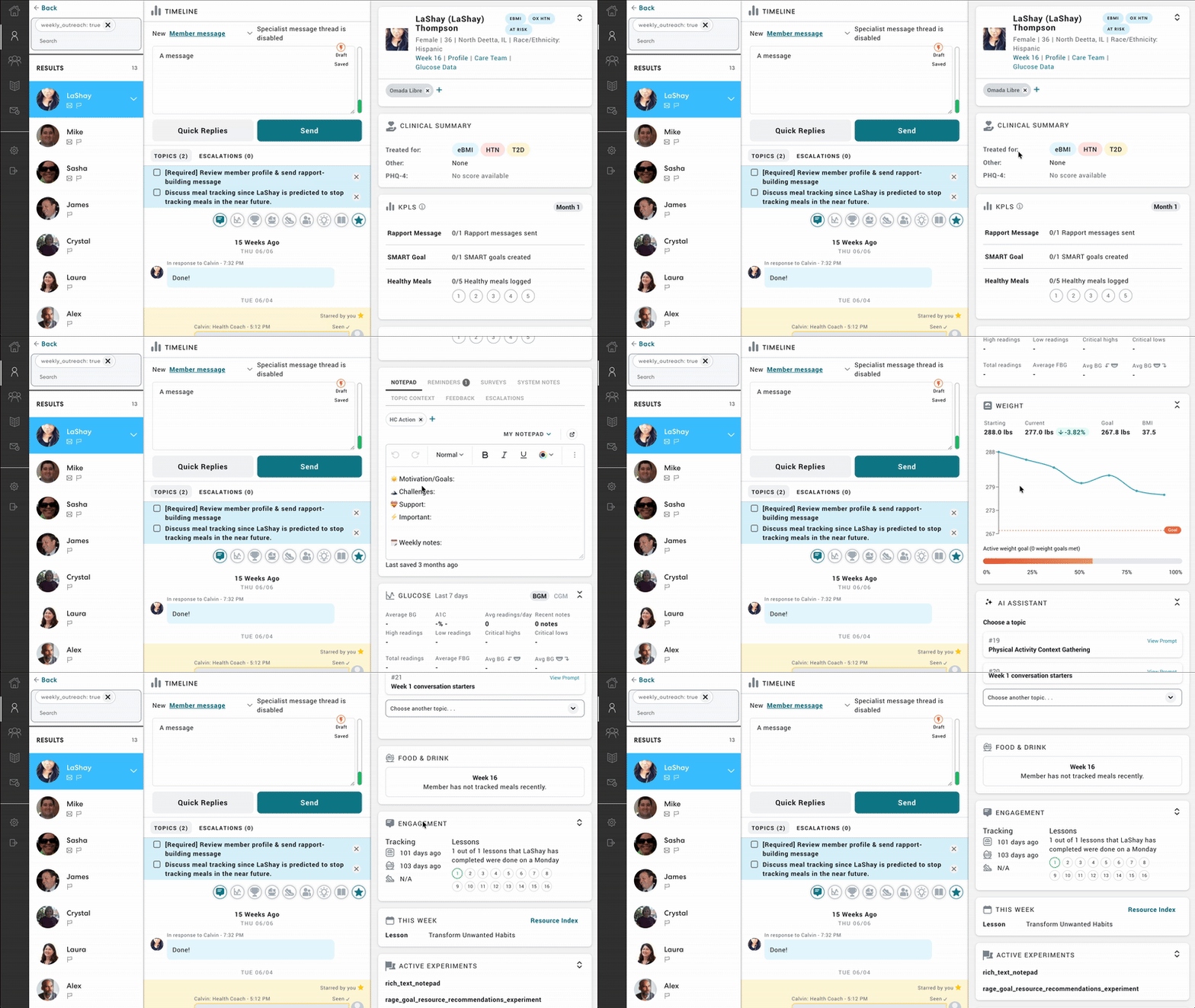
We had a short timeline and needed to move quickly. To support that pace, and ensure we “got it right” under a tight timeline, I knew I would need regular user feedback cycles to validate assumptions and design decisions.
To that end, I advocated for and got approval from our operations team to establish a group of coaches who would support the project. I met weekly with these coaches during design and development for feedback and co-creation, and the group became advocates of the redesign, helping to socialize the changes with the broader coaching team and supporting a smooth launch. This project wouldn’t have ben successful without them!
Information Architecture
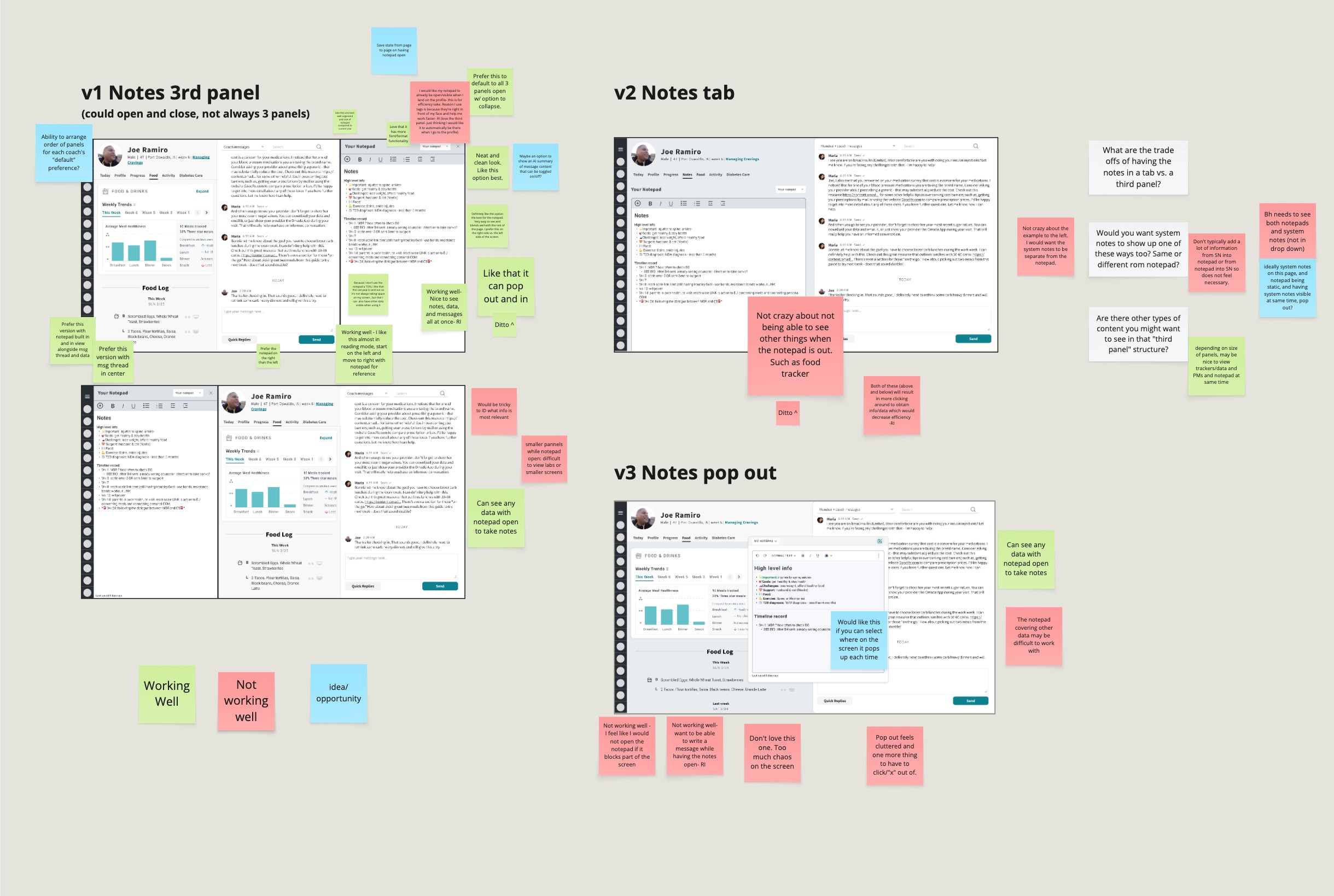
Establishing a clear and intuitive information architecture was crucial for the success of the product long term. Many teams would contribute to the platform and the application needed to scale to incorporate more data and capabilities as the program evolved.I conducted several card sorting sessions to understand how information should be grouped together and landed on a flexible 2-3 column layout that would support simultaneously accessing contextually relevant information and focusing coaches on key tasks by centralizing related information.
Exploring opportunities for AI Automation
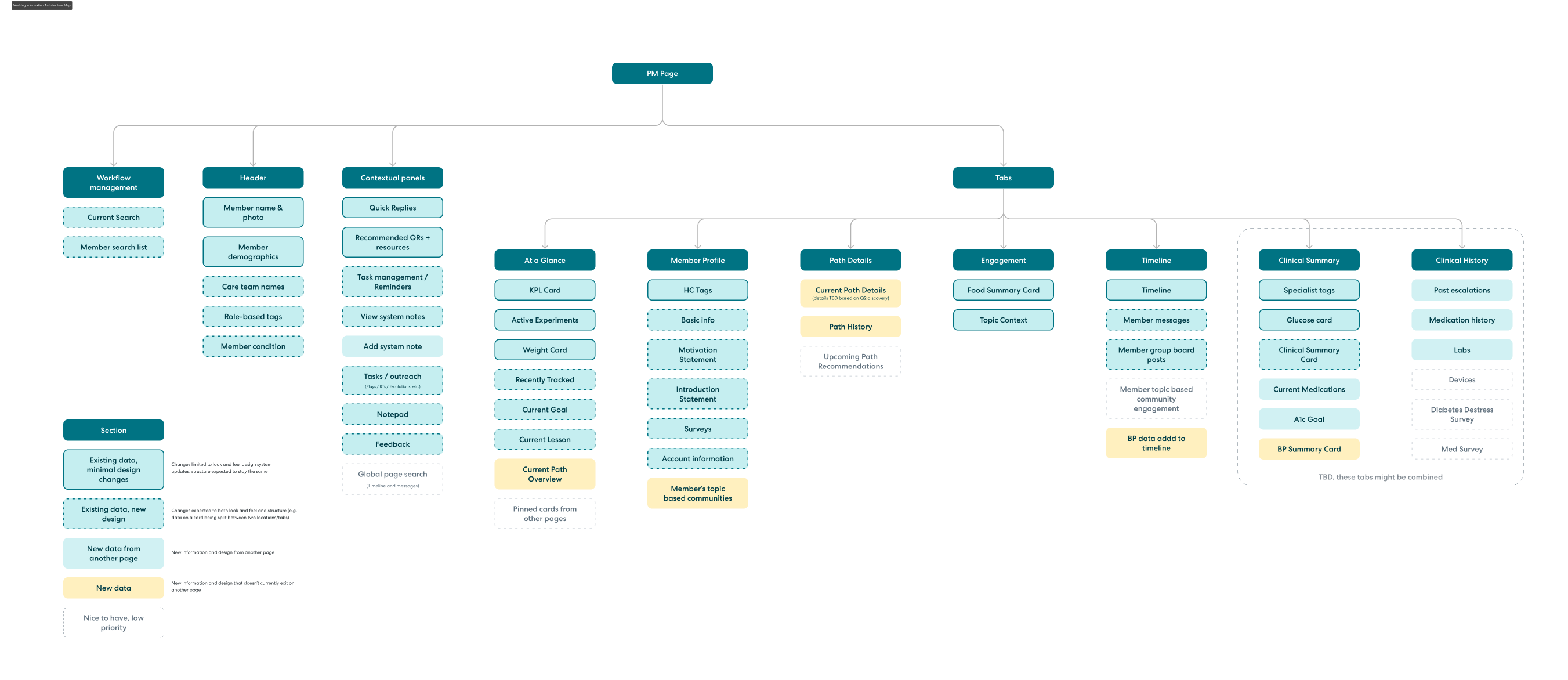
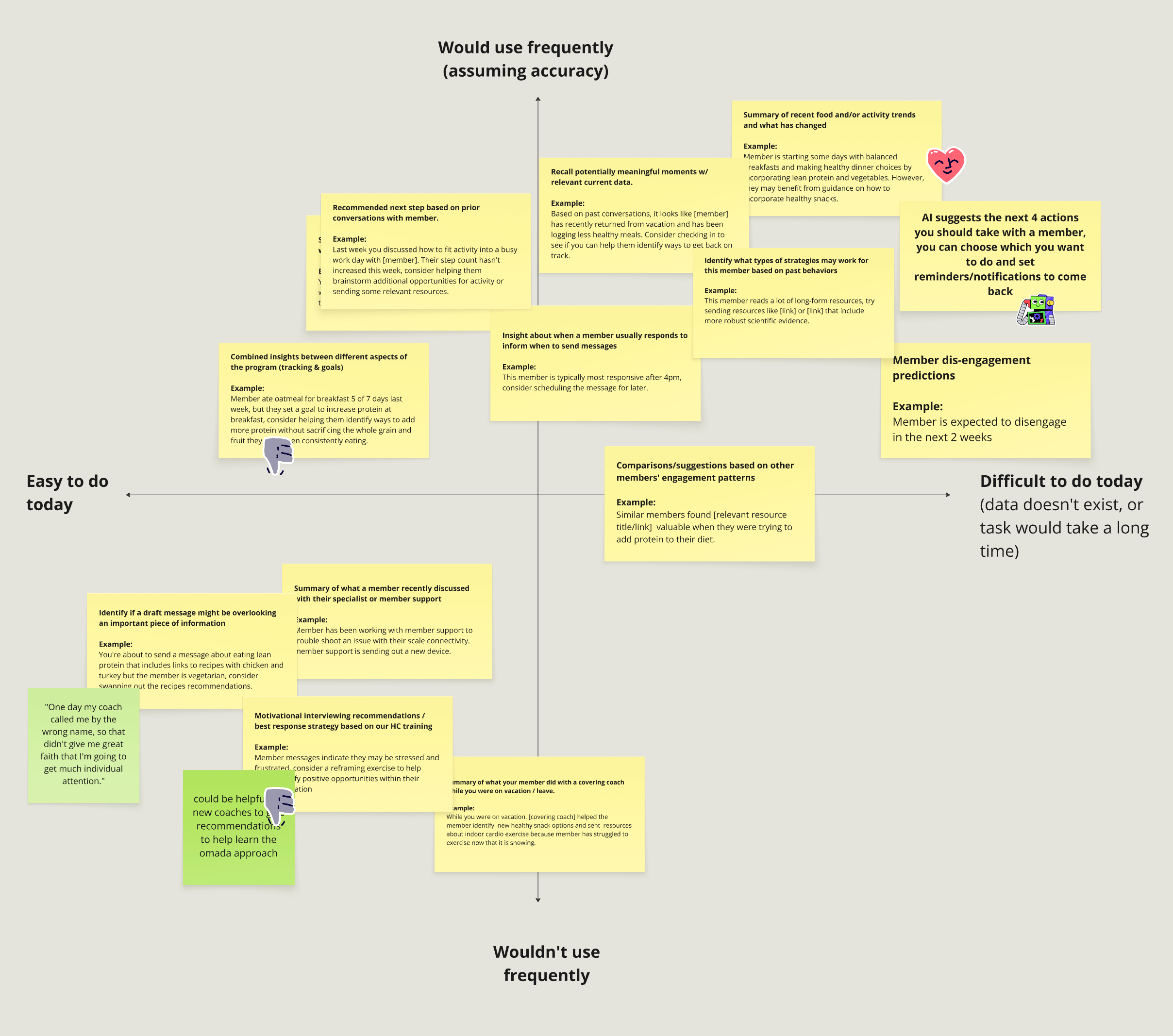
In addition to re-organizing existing data, we needed to create better tools to automate tasks and summarize data to enable coaches to quickly understand each patient’s unique needs and focus their time on what they were best at—providing support, building rapport, and helping patients overcome their unique challenges.
We ran brainstorming sessions with coaches, then involved them in collaborative prompt engineering sessions to co-create the first use case for AI. I felt it was especially important to collaborate with users as there was a lot of fear on the coaching team that AI would lead to layoffs and we wanted to alleviate that fear and ensure we developed features that would be adopted and useful long term.
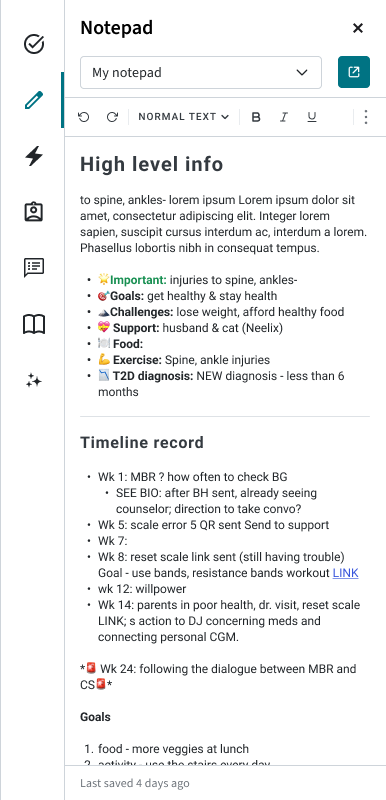
We landed on a feature that summarized and centralized introductory data for new patients to enable coaches to quickly get up to speed and build rapport when someone joined the program. In pilots, this feature drove a 23% reduction in week one time spent, a massive operational cost savings.
Visual Design
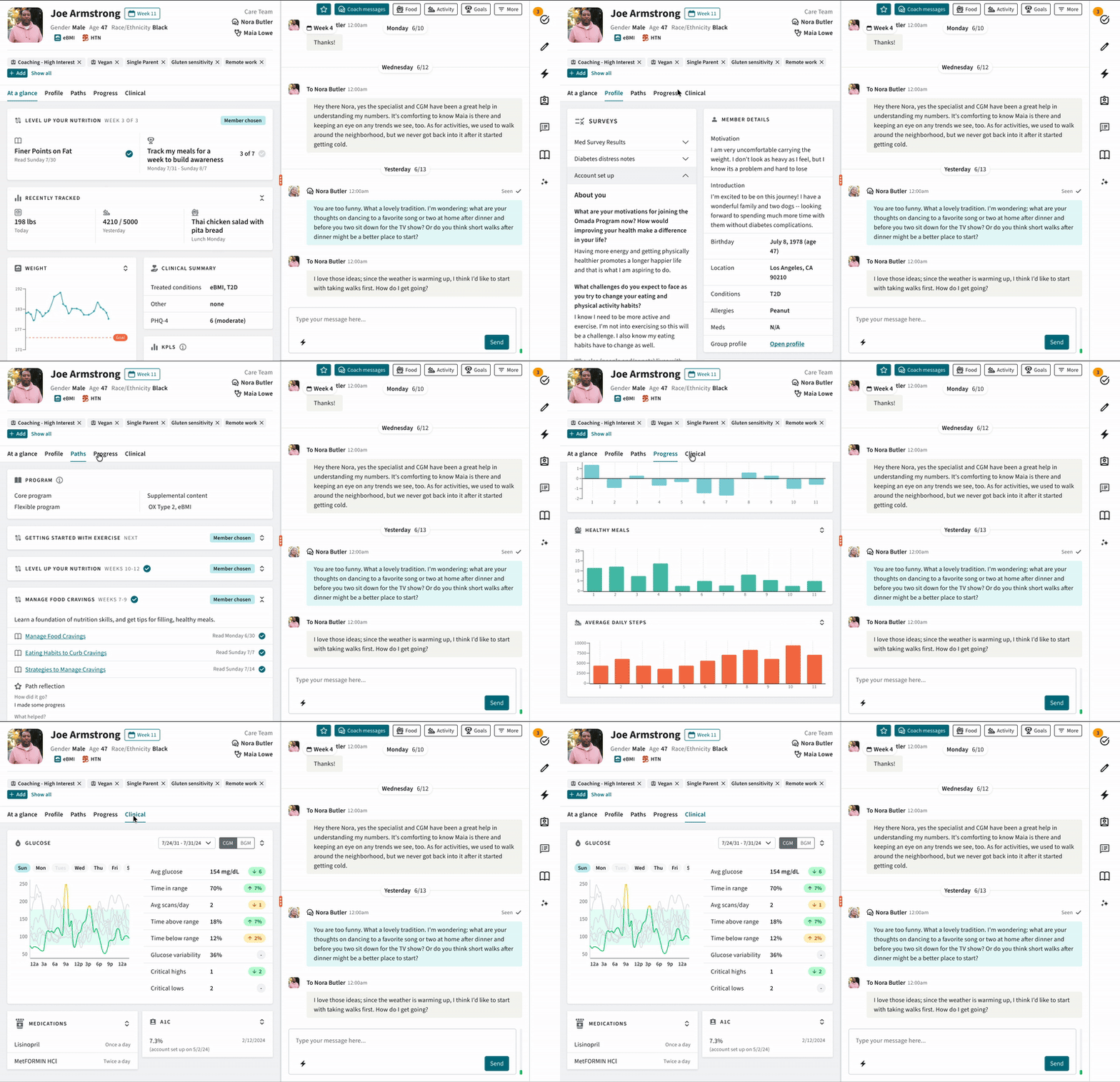
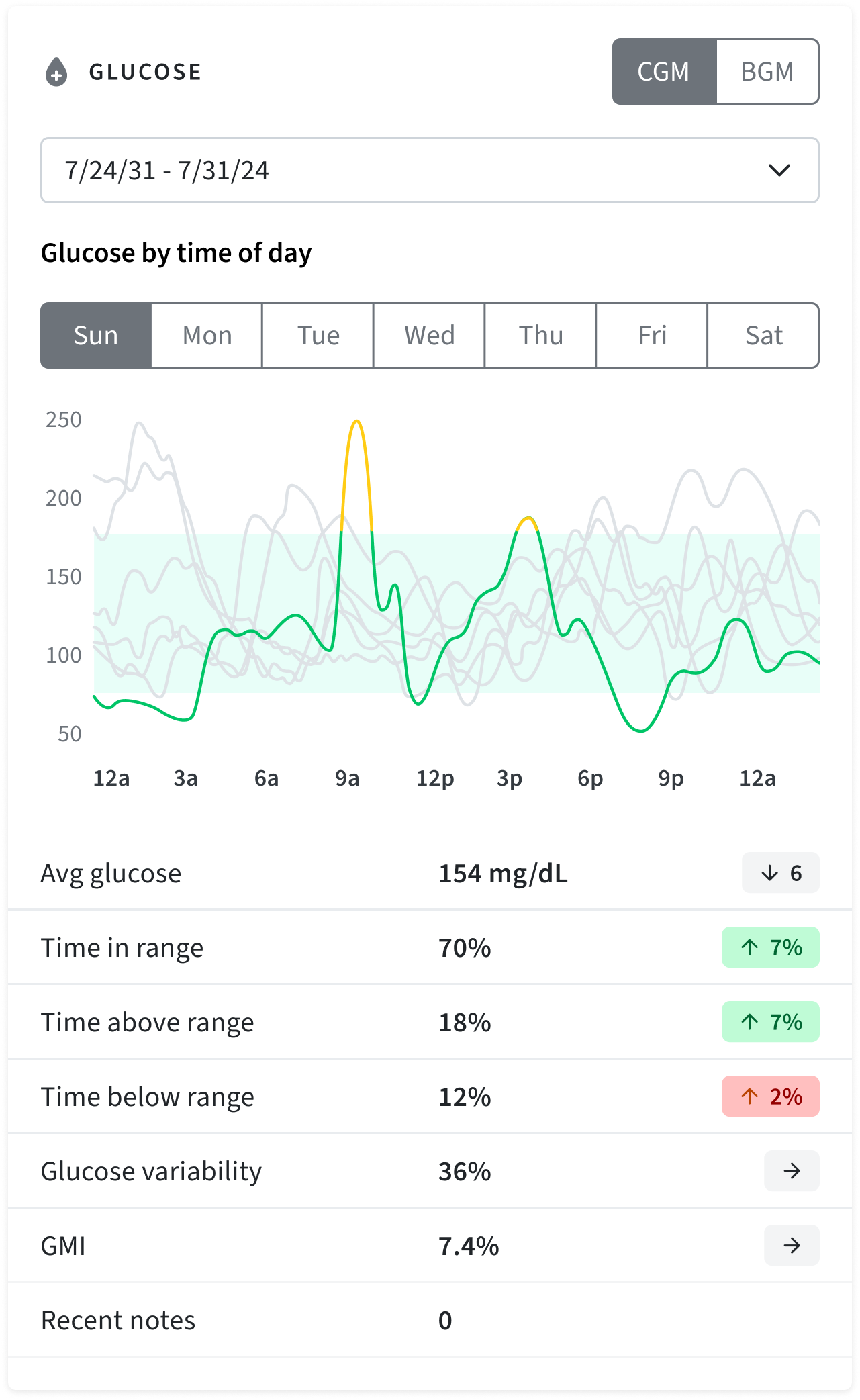
Coaches used this application for 6+ hours a day and many exclusively used a 13in laptop for their work, so space efficiency and legibility were paramount. In addition, accessibility of colors, fonts, text sizes, and interactions was important to consider in meeting the varied needs of the team. I landed on a system that used color sparingly to indicate interactive elements and a stop-light scheme to indicate severity in patient data and required actions that coaches needed to take.
Design system & Component library
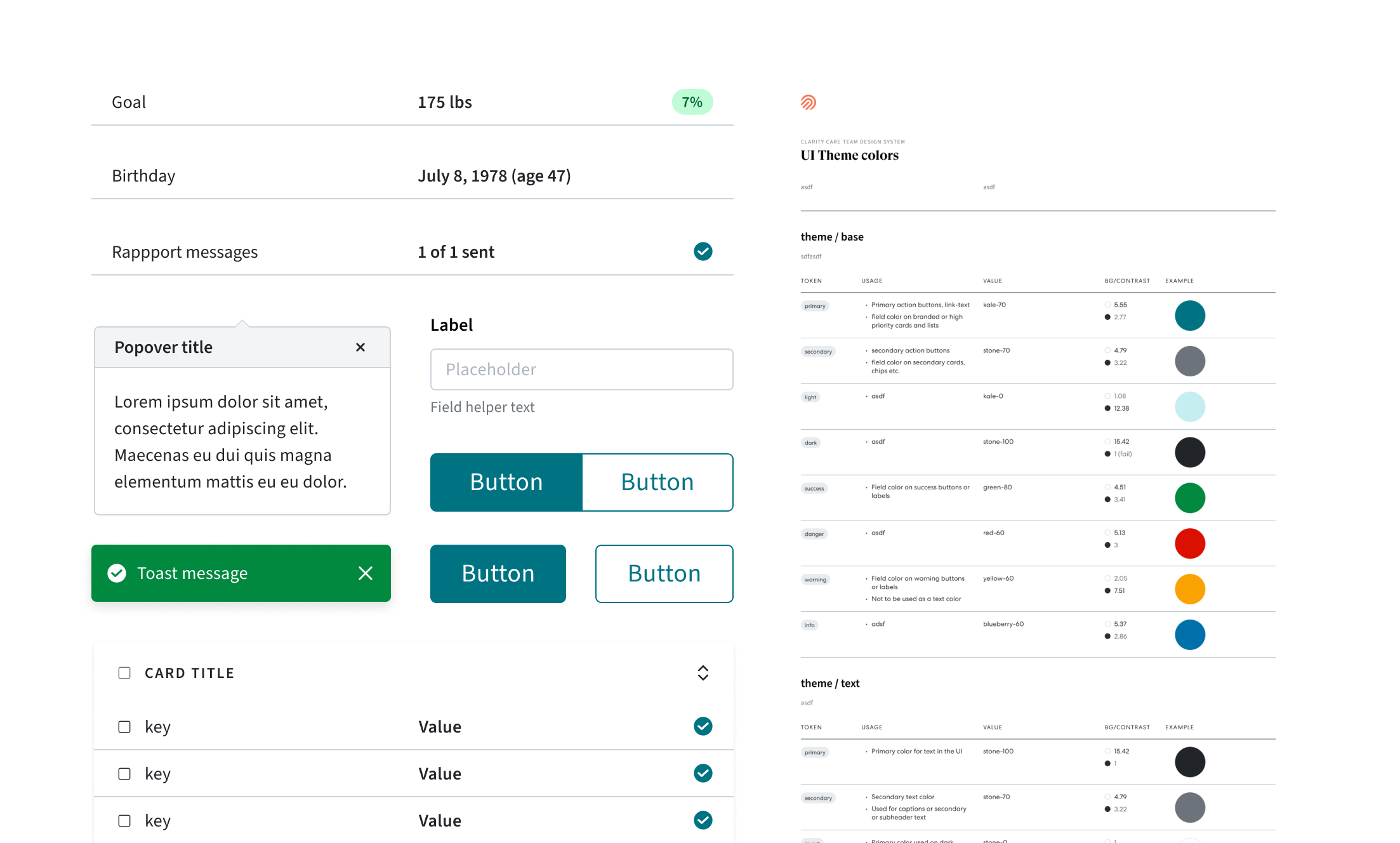
As part of this work I implemented a new design system and component library to enable other designers to contribute to the platform in a seamless and visually consistent way.
While simple, the library included key components, colors, and type styles and was built to align with a technical component library to make hands offs between designers and engineers as easy as possible.
Human lead, AI enhanced coaching
Human coaches are a key differentiator at Omada, but their tools had not kept up with a rapidly evolving program. In 6 months we went from concept to launch on a brand new system enabling our coaching team to work with patients more efficiently and effectively by restructuring the information architecture, simplifying the visual language, and introducing new AI tools to automate rote tasks.
impact
Positive feedback from users and build teams
23% decrease in week 1 time spent
My Role
I was the sole designer on this project running our weekly co-design research sessions, defining the experience strategy, and executing on the UI work. I also worked with our operations team to socialize and train coaches on the new tool.

Where we started
The team focused on developing our internal tools had struggled to get stakeholder buy in for a major overhaul for years, and the system had reached a breaking point. I’d worked the year before on a vision for our patient experience and used that as a jumping off point to build buy in for redesigning our internal tooling to support the new patient-facing features.
I worked with the operations team, the squad that owned the internal platform, and our product leadership team to build a case for why we needed to redesign and refactor our coaching tools now. Once I had buy in, I embedded with the squad responsible to bring the vision to life.
Co-Design & Continuous researCH process
We had a short timeline and needed to move quickly. To support that pace, and ensure we “got it right” under a tight timeline, I knew I would need regular user feedback cycles to validate assumptions and design decisions.
To that end, I advocated for and got approval from our operations team to establish a group of coaches who would support the project. I met weekly with these coaches during design and development for feedback and co-creation, and the group became advocates of the redesign, helping to socialize the changes with the broader coaching team and supporting a smooth launch. This project wouldn’t have ben successful without them!
Information Architecture
Establishing a clear and intuitive information architecture was crucial for the success of the product long term. Many teams would contribute to the platform and the application needed to scale to incorporate more data and capabilities as the program evolved.I conducted several card sorting sessions to understand how information should be grouped together and landed on a flexible 2-3 column layout that would support simultaneously accessing contextually relevant information and focusing coaches on key tasks by centralizing related information.
Exploring opportunities for AI Automation
In addition to re-organizing existing data, we needed to create better tools to automate tasks and summarize data to enable coaches to quickly understand each patient’s unique needs and focus their time on what they were best at—providing support, building rapport, and helping patients overcome their unique challenges.
We ran brainstorming sessions with coaches, then involved them in collaborative prompt engineering sessions to co-create the first use case for AI. I felt it was especially important to collaborate with users as there was a lot of fear on the coaching team that AI would lead to layoffs and we wanted to alleviate that fear and ensure we developed features that would be adopted and useful long term.
We landed on a feature that summarized and centralized introductory data for new patients to enable coaches to quickly get up to speed and build rapport when someone joined the program. In pilots, this feature drove a 23% reduction in week one time spent, a massive operational cost savings.
Visual Design
Coaches used this application for 6+ hours a day and many exclusively used a 13in laptop for their work, so space efficiency and legibility were paramount. In addition, accessibility of colors, fonts, text sizes, and interactions was important to consider in meeting the varied needs of the team. I landed on a system that used color sparingly to indicate interactive elements and a stop-light scheme to indicate severity in patient data and required actions that coaches needed to take.
Design system & Component library
As part of this work I implemented a new design system and component library to enable other designers to contribute to the platform in a seamless and visually consistent way.
While simple, the library included key components, colors, and type styles and was built to align with a technical component library to make hands offs between designers and engineers as easy as possible.
Human lead, AI enhanced coaching
Human coaches are a key differentiator at Omada, but their tools had not kept up with a rapidly evolving program. In 6 months we went from concept to launch on a brand new system enabling our coaching team to work with patients more efficiently and effectively by restructuring the information architecture, simplifying the visual language, and introducing new AI tools to automate rote tasks.
impact
Positive feedback from users and build teams
23% decrease in week 1 time spent
My Role
I was the sole designer on this project running our weekly co-design research sessions, defining the experience strategy, and executing on the UI work. I also worked with our operations team to socialize and train coaches on the new tool.

Where we started
The team focused on developing our internal tools had struggled to get stakeholder buy in for a major overhaul for years, and the system had reached a breaking point. I’d worked the year before on a vision for our patient experience and used that as a jumping off point to build buy in for redesigning our internal tooling to support the new patient-facing features.
I worked with the operations team, the squad that owned the internal platform, and our product leadership team to build a case for why we needed to redesign and refactor our coaching tools now. Once I had buy in, I embedded with the squad responsible to bring the vision to life.
Co-Design & Continuous researCH process
We had a short timeline and needed to move quickly. To support that pace, and ensure we “got it right” under a tight timeline, I knew I would need regular user feedback cycles to validate assumptions and design decisions.
To that end, I advocated for and got approval from our operations team to establish a group of coaches who would support the project. I met weekly with these coaches during design and development for feedback and co-creation, and the group became advocates of the redesign, helping to socialize the changes with the broader coaching team and supporting a smooth launch. This project wouldn’t have ben successful without them!
Information Architecture
Establishing a clear and intuitive information architecture was crucial for the success of the product long term. Many teams would contribute to the platform and the application needed to scale to incorporate more data and capabilities as the program evolved.I conducted several card sorting sessions to understand how information should be grouped together and landed on a flexible 2-3 column layout that would support simultaneously accessing contextually relevant information and focusing coaches on key tasks by centralizing related information.
Exploring opportunities for AI Automation
In addition to re-organizing existing data, we needed to create better tools to automate tasks and summarize data to enable coaches to quickly understand each patient’s unique needs and focus their time on what they were best at—providing support, building rapport, and helping patients overcome their unique challenges.
We ran brainstorming sessions with coaches, then involved them in collaborative prompt engineering sessions to co-create the first use case for AI. I felt it was especially important to collaborate with users as there was a lot of fear on the coaching team that AI would lead to layoffs and we wanted to alleviate that fear and ensure we developed features that would be adopted and useful long term.
We landed on a feature that summarized and centralized introductory data for new patients to enable coaches to quickly get up to speed and build rapport when someone joined the program. In pilots, this feature drove a 23% reduction in week one time spent, a massive operational cost savings.
Visual Design
Coaches used this application for 6+ hours a day and many exclusively used a 13in laptop for their work, so space efficiency and legibility were paramount. In addition, accessibility of colors, fonts, text sizes, and interactions was important to consider in meeting the varied needs of the team. I landed on a system that used color sparingly to indicate interactive elements and a stop-light scheme to indicate severity in patient data and required actions that coaches needed to take.
Design system & Component library
As part of this work I implemented a new design system and component library to enable other designers to contribute to the platform in a seamless and visually consistent way.
While simple, the library included key components, colors, and type styles and was built to align with a technical component library to make hands offs between designers and engineers as easy as possible.